A 105-Second Demo Video Took Me Days to Make
I built Neonloops in 26 days. The demo video for the landing page? That took way longer than I expected.
Not “longer” as in an afternoon instead of an hour. Longer as in days of recording, re-recording, trimming, zooming, annotating, re-timing, and questioning my life choices. For 105 seconds of final output.
Here’s what actually happened.
Finding the right tool
First problem: I needed screen recording software that could do more than just capture my screen. Zoom effects, annotations, speed adjustments, trimming — the basics for a polished demo.
There are tons of SaaS options out there. Slick landing pages, smooth demos (ironic), free trials that convert to $20/month subscriptions. I almost fell for a couple of them. But I didn’t want to pay for something I’d use a handful of times.
I found Openscreen — fully open-source, fully free. It’s not perfect. The UI takes some getting used to, keyboard shortcuts aren’t intuitive, and some features feel rough around the edges. But it has what matters: speed controls, zoom, annotations, and trimming.
Good enough. Let’s go.
The AI script trap
My first move was smart in theory: use AI to generate a demo script. Every second planned out. What to click, what to type, what text to show on screen.
The script looked great on paper. Professional. Detailed. Each step mapped to a timestamp.
Two problems. First, it was a marketing disaster. The AI wrote a feature tour, not a value pitch. It walked through every button and panel instead of showing why someone would care about Neonloops. Second, the AI estimated 90 seconds. The actual recording came out to 4 minutes and 30 seconds.
Turns out, reality is slower than scripts. You pause between clicks. Loading screens happen. You make mistakes and redo things. The gap between an AI’s estimate and real human interaction is massive.
Iteration hell
I didn’t rewrite the script from scratch. I went through it a few times, cutting aggressively, focusing on the core value proposition: build an AI workflow visually, connect nodes, hit run, watch it execute. That’s it. That’s what matters.
The AI helped with the writing — all the ideas and structure came from me, it just handled the words. After a few rounds, I had a tight script focused on what Neonloops actually does for people.
The second recording session was much easier. A few takes with minor mistakes, and I had clean footage. About 2 minutes raw, which I trimmed down to 105 seconds.
Getting the raw footage was the easy part. Editing it was where I lost my mind.
Zoom timing: a special kind of pain
A good demo video zooms into the action. You don’t want viewers squinting at a full-screen recording trying to find the cursor.
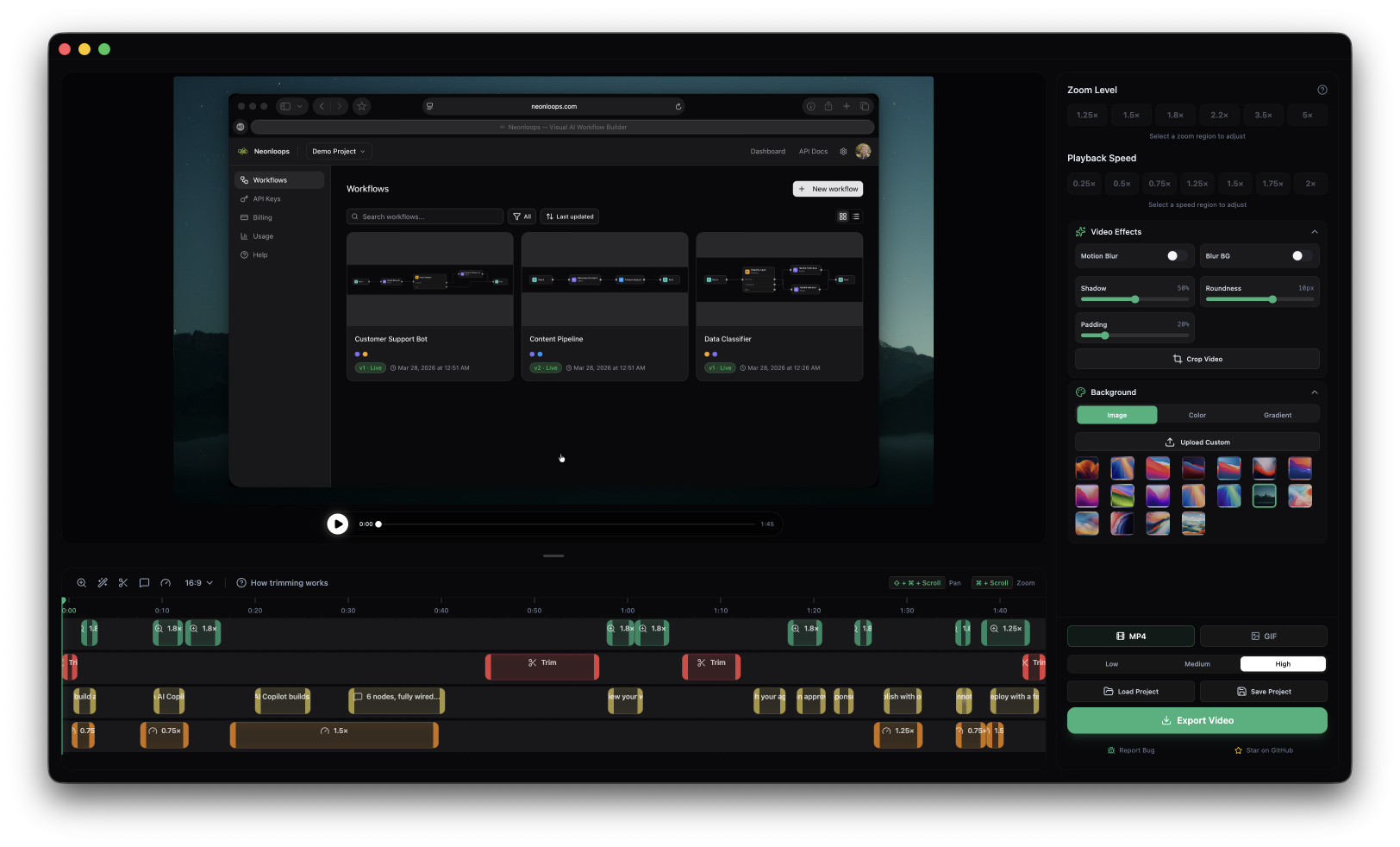
Openscreen has zoom functionality. What it doesn’t have is adjustable zoom transition speed. The default speed is too fast — it snaps instead of gliding. There’s no slider, no config, no workaround.
I considered switching tools. But I’d already invested time learning this one, and finding another free option with better zoom controls felt like a rabbit hole I’d never climb out of.
So I worked with what I had. I set zoom keyframes down to the millisecond using keyboard shortcuts, trying to make transitions feel smooth despite the tool fighting me. Dozens of attempts. Move the keyframe 200ms earlier. No, 100ms later. That’s too jumpy. Back to the previous timing. Actually, 50ms earlier than that.
This is the kind of work that makes you question whether anyone will even notice. They will. Janky zoom transitions make a demo feel amateur, even if the product is solid.
Annotations: harder than they look
The video needed text overlays explaining what’s happening on screen. Openscreen calls these annotations.
Simple, right? Pick a font, type the text, position it on screen. Done.
Not done. Each annotation needs to appear at the exact right moment, stay visible long enough to read, and disappear before the next action. It needs to be positioned where there’s empty space on screen — and that empty space changes as you zoom in and out.
I spent hours placing text in spots that looked perfect, only to realize the zoom transition would shift the viewport and the text would end up overlapping a button or sliding off-screen. So I’d adjust the timing, which would break the zoom sync, which would require re-adjusting the zoom, which would move the empty space, which would require repositioning the text.
It’s a chain reaction of tiny adjustments where fixing one thing breaks two others.
The cutting room floor
On top of zoom and annotation work, the raw footage needed cleanup. Moments where I waited too long before clicking. A wrong click that I corrected. An unusually slow page load. A tab switch to copy pre-written text from a text editor — because I was using prepared content for the demo, I had to switch away from the app to grab it.
Some pauses were too short to cut entirely without creating a jarring jump. For those, I used speed adjustments — 2x or 3x to compress dead time without the visual jolt of a hard cut. Other sections moved too fast, so I slowed them down to give viewers time to process what was happening.
Every second of a 105-second video has decisions behind it. Real time or sped up? Cut or compress? Zoom here or keep it wide? Show text or let the UI speak?
What I learned
AI scripts are a starting point, not a solution. The first AI-generated script was a feature list, not a story. It took human judgment to reshape it into something that communicates value. AI is great at structure and words, but it doesn’t understand what makes someone want to sign up.
Tool cost isn’t just money. I saved money by using open-source tools, but I paid in time. The zoom transition limitation alone cost me hours. For a one-time task, that trade-off was fine. If I were making demo videos regularly, I’d pay for better tooling without hesitation.
Demo videos are a craft. I went into this thinking “record screen, add some text, done.” It’s not. A good demo video is edited frame by frame. Every transition, every annotation, every speed change matters. The difference between “looks professional” and “looks like a screen recording” is dozens of small decisions.
105 seconds is a lot of seconds. When you’re responsible for every single one of them, you realize how dense a minute and 45 seconds can be.
The final result
The demo is on the Neonloops landing page now. Nobody watching it will know about the millisecond zoom adjustments or the three different scripts or the hours of re-timing annotations. That’s the point. It should look effortless.
It very much was not.